












































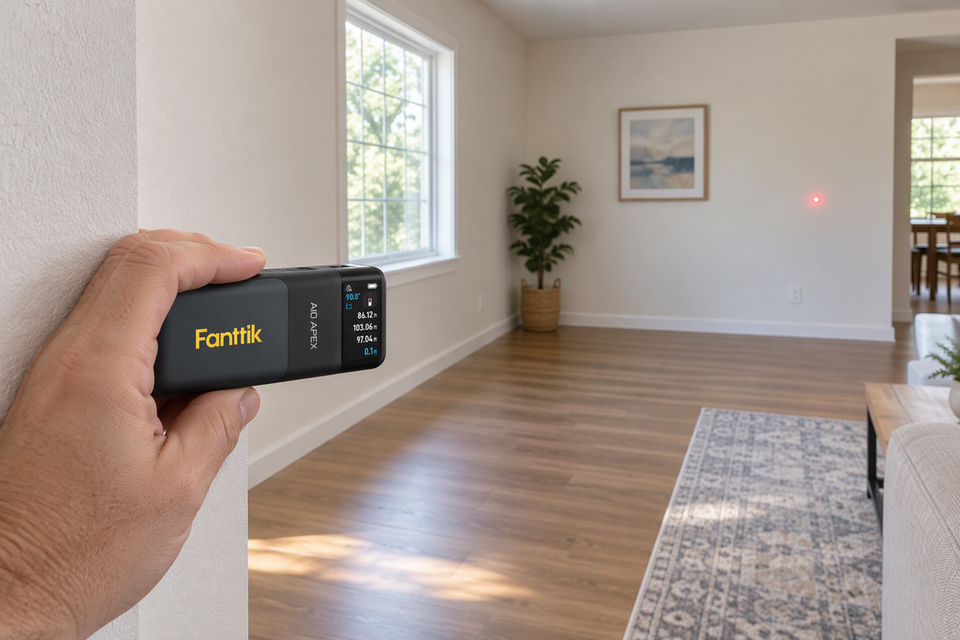
Start the measurement from the reference point that sits on the edge you are measuring from. If the back of the meter is pressed against a wall, use the rear reference. If your plan starts at a different edge, choose the documented point that lines up with that edge, because neither front nor back is right for every job.

A "fixed reference" is less a special button than a rule for your layout: pick one starting datum and tie every related reading to it. If you switch the laser measure reference point partway through, a whole set of numbers can shift by the same amount.
Choose the Reference That Matches Your Starting Edge
The reading on the screen runs from the meter's selected origin to the spot where the laser lands. That origin is whatever reference point is active, so the back edge of the tool is not automatically where the measurement begins.
The practical method is simple. One laser distance measurer guide says to choose a reference position and line up the meter to match it, then read the manual for your specific model for details. In everyday room work, that means you decide where the measurement should start first, then set the meter so its active origin sits there.
Here is how that plays out:
- Measuring wall to wall: Rest the back of the meter flat against the starting wall and select the rear reference. The reading then covers the full span from that wall to the target.
- Starting from another edge: If your plan begins at a different surface or mark, select the documented reference point that matches it, then place that part of the meter on the starting edge.
- Holding a fixed datum: For a layout, "fixed" means you keep the same chosen starting edge and the same matching origin for every reading in the set. Your meter may not have a setting with that name, and it does not need one.
Available reference points, their names, and the controls that switch them vary from model to model. Your manual tells you which origins your meter offers and how to select them. The decision itself stays the same: match the active laser measure reference point to the edge your plan starts from.
Why a Reference Change Can Shift a Layout
Changing the reference point moves the start of the measured line, so the number changes even when nothing else does. Some meters offer several origins. The same guide lists front and rear positions, plus a corner extension piece, as possible options.
The effect follows from basic geometry. Keep the meter in the same spot, aimed at the same target. Call the first reading D₁. Now switch to a second origin that sits closer to the target by a distance s, measured along the laser's line. The new reading is D₂ = D₁ − s. If the second origin sits farther from the target, the reading grows by s instead.
Picture the wall case. The rear origin touches the wall, and the front origin faces the target. Switch from rear to front without moving the meter, and the reading drops by the along-axis gap between those two origins. As an illustrative example only, a rear-reference reading of 120 inches would become 120 − s inches. Look up s in your meter's documentation. It is not necessarily the full length of the tool body.
That is how a systematic error occurs. When meter pose, target direction, and the distance between origins stay the same, each reading taken with that mismatched origin shifts by that same along-axis separation. In other setups, switching reference points can still shift readings unpredictably. Your layout can look consistent on paper while its baseline sits in the wrong place, so a shelf, cut line, or furniture plan lands off mark.
Keep this separate from accuracy. The accuracy spec describes how closely the meter measures from its selected origin. A range spec describes how far it can measure. The reference point only decides where the measurement starts.
Keep One Datum Across Repeated Measurements
Before you combine several readings into one plan, confirm they all start from the same place. This short sequence keeps a set of readings usable together:
- Name the starting edge. Before measuring, decide which wall, edge, or mark is the datum for this layout, and note it on your sketch.
- Set and place the meter to match. As the guide advises, choose the reference position and line up the meter accordingly, so the active origin sits on that named edge.
- Hold that origin for the whole set. Keep the same reference selection and the same placement against the datum for every reading you plan to add, subtract, or compare.
- Check before you combine. If any reading used a different origin, retake it. Convert it only when you know the separation between the two origins and which way it runs.
Your manual is the place to confirm how your specific meter shows the active reference and how you change it. Display icons, button sequences, and whether a setting stays put after shutdown differ between models, so look at the screen rather than assuming.
Consistency matters most when readings feed a cut list. If you measure wall lengths before you measure and cut baseboards, take each run from the same documented origin so every piece starts from the same corner logic.

FAQs
Does the reference setting change how accurate my laser measure is?
No. The reference point sets where the measurement begins, while the accuracy spec describes how closely the meter measures from that point. A wrong origin creates an offset you can correct by retaking the reading. Better accuracy will not fix an offset.
Can I fix a reading taken from the wrong reference instead of retaking it?
Only if you know the exact separation between the two origins along the laser line and which origin was closer to the target. Without both, retaking the reading with the correct origin is faster and avoids carrying a guess into your layout.
What is a corner extension piece used for?
Some meters include a fold-out piece that acts as another reference position. It helps when the measurement should start from an inside corner or edge where the front or back of the meter cannot sit flush. Use it only if your manual documents it, and select it so the reading starts from that piece.
Will my meter remember the last reference setting?
That depends on the model. Some meters may hold a setting while others reset it, and the manual is the only reliable answer for yours. Either way, glance at the display before each measuring session so the active origin matches your planned datum.
Continue reading
 Drilling Wood, Metal, or Plastic: Why One Speed Setting Won’t Suit Every Job
Why wood and metal call for different drill speeds, how bit diameter and hole depth shift the choice,...
Drilling Wood, Metal, or Plastic: Why One Speed Setting Won’t Suit Every Job
Why wood and metal call for different drill speeds, how bit diameter and hole depth shift the choice,...
 How to Drill Plastic Without Cracking It
A step-by-step method for drilling holes in plastic sheet or parts, plus bit angle guidance for acrylic and...
How to Drill Plastic Without Cracking It
A step-by-step method for drilling holes in plastic sheet or parts, plus bit angle guidance for acrylic and...
Leave a comment
This site is protected by hCaptcha and the hCaptcha Privacy Policy and Terms of Service apply.