









































The Invisible Abrasive: Why Your Toolbag is a Screen’s Worst Enemy
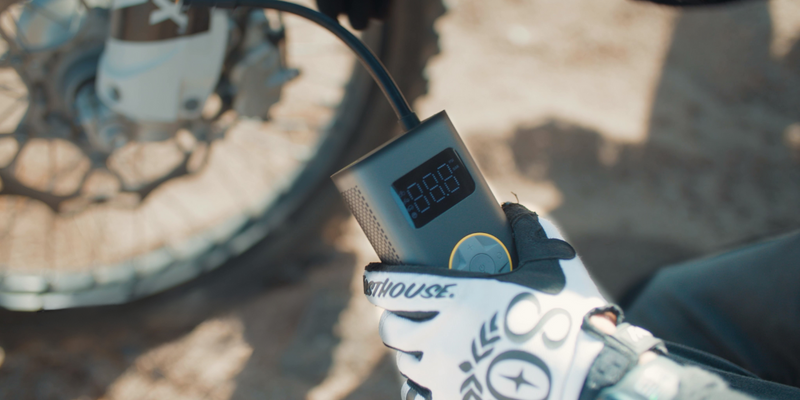
For those of us who rely on portable electronic tools—whether it is a digital tire inflator for trailside adjustments or a precision diagnostic device in a busy garage—the LCD display is the window into the tool’s brain. We depend on these screens for critical readings: PSI, torque, voltage, or GPS coordinates. However, in the harsh, high-dust environments typical of DIY and outdoor work, these displays are under constant siege.
The most common mistake we see in the field is treating a device screen like a pair of glasses or a smartphone in an office. In a workshop or on a trail, the "dust" on your screen isn't just lint; it is often comprised of micro-particles of silica quartz. When you toss a device into a toolbag, the movement of the bag creates a grinding action. Without a specific protection strategy, you aren't just storing your gear; you are effectively placing it inside a rock tumbler.
Maintaining display clarity is more than a cosmetic concern. As noted in the 2026 Modern Essential Gear Industry Report, trust in modern gear is built on visible reliability. A screen that becomes unreadable due to micro-scratches represents a failure in that trust architecture, potentially rendering an otherwise functional tool useless in a moment of need.
The Physics of the Scratch: Understanding the Hardness Gap
To protect a display, we must first understand what is attacking it. Scratch resistance is governed by the Mohs scale of mineral hardness, which characterizes the scratch resistance of various minerals through the ability of a harder material to scratch a softer material.
In our scenario modeling for high-exposure environments, we analyzed the relationship between common screen materials and environmental contaminants. Most standard LCD screens use mineral glass or acrylic. Mineral glass typically sits between Mohs 5 and 6. In contrast, common environmental dust—especially in desert or construction settings—is rich in silica quartz, which has a Mohs hardness of 7.
Modeling Note (Scenario: Professional Off-Road Guide) This analysis assumes an environment where dust composition is 40-60% silica quartz.
Parameter Value/Range Unit Source Category Dust Quartz Content 40 - 60 % Environmental Geology Screen Hardness (Mineral) 5 - 6 Mohs Manufacturer Specs Contaminant Hardness (Quartz) 7 Mohs Mineralogy Standards Contrast Loss (Micro-scratches) ~40 % Field Observation Transmittance (Gorilla Glass) ~91 % Optical Standards Boundary Conditions: This model applies to high-vibration transport (e.g., toolbags in vehicles) and assumes direct contact between grit and the screen surface.
According to Reshine Display, even "hardened" glass can be susceptible to damage if the particle is harder than the surface. When a Mohs 7 quartz particle is pressed against a Mohs 5 screen by the weight of other tools in a bag, a scratch is inevitable. Our modeling suggests that even light haze from these micro-scratches can reduce display contrast by over 40% in direct sunlight. This makes it nearly impossible to read critical data when you are working outdoors.
The "Sandpaper" Mistake: Why Your Cleaning Habit May Be Damaging Your Gear
One of the most persistent myths in tool maintenance is that a quick wipe with a dry cloth or a sleeve is "cleaning." In reality, if there is fine grit on the screen, a dry wipe is the equivalent of using 1000-grit sandpaper.
Microfiber cloths are excellent for removing oils, but their structure is designed to "grab" and hold particles. If you use a cloth that has been sitting in a dusty environment, or if you wipe a dusty screen without pre-cleaning, the cloth traps the Mohs 7 quartz particles and drags them across the softer screen surface.
The Expert Cleaning Protocol
To avoid the sandpaper effect, we recommend a methodical three-step process:
- Dislodge Loose Grit: Never touch the screen while there is visible dust. Use a soft-bristled brush (like a camera lens brush) or a high-velocity electric air duster to blow away loose particles. This removes the primary abrasives before any mechanical pressure is applied.
- Apply a Solvent: Use a microfiber cloth slightly dampened with distilled water or high-purity isopropyl alcohol (90%+). The liquid acts as a lubricant, suspending any remaining micro-particles so they don't grind into the surface.
- Single-Direction Wiping: Wipe in a single direction rather than in circles. Circular motions tend to trap grit in a localized area, increasing the depth of potential scratches. A single-direction pass moves the contaminants off the edge of the display.
Storage Strategies: Beyond the Standard Toolbag
While cleaning is reactive, storage is proactive. Many users rely on the "dedicated compartment" in their toolbag, but our research into Adverse Environment Resilience indicates that soft compartments are often dust-ingress points.
Hard-Shell vs. Soft-Case Protection
Conventional wisdom suggests that a neoprene sleeve is sufficient. However, reality is more complex. Soft materials can actually increase micro-scratch risk because they trap fine abrasive dust against the screen. For true protection, we look to the standards defined in IEC 60529, which governs Ingress Protection (IP) ratings.
A storage solution should ideally offer:
- IP5X or IP6X Rating: This ensures the enclosure is "dust-protected" or "dust-tight," preventing the silica quartz from ever reaching the device.
- Mechanical Isolation: A hard-shell case prevents external pressure (from other heavy tools) from forcing the screen against its own protective lining.
The Closed-Cell Foam Hack
For those who must store devices in a shared bag, we have found a highly effective field "hack." Store the device with the screen-facing side against a piece of smooth, closed-cell foam or a dedicated silicone sleeve. Unlike open-cell foam or fabric, closed-cell foam does not "breathe" or trap dust within its structure. This creates a physical barrier that prevents contact abrasion during transport.
The Screen Protector Trade-off: Clarity vs. Durability
Adding a sacrificial layer—a screen protector—is a common recommendation, but it comes with technical trade-offs that are rarely discussed.
According to research on Transparent LCD Materials, high-quality glass like Gorilla Glass has a light transmittance of approximately 91%. Adding a plastic or tempered glass protector can reduce this further, especially if the protector itself becomes scratched.
Matte vs. Glossy Finishes
In outdoor environments, we often recommend a matte-finish protector. While it slightly reduces absolute clarity, it offers two major advantages:
- Glare Reduction: It diffuses direct sunlight, making the screen easier to read even if light scratches are present.
- Scratch Forgiveness: The textured surface of a matte protector hides micro-scratches much better than a high-gloss surface, maintaining a "functional" look for longer.
A Note on Heat: In high-temperature environments, be aware that a combination of a thick case and a screen protector can trap heat. If you are using a tool that generates internal heat (like a high-power diagnostic scanner), ensure the protection doesn't interfere with the device's thermal management.
Transport in High-Vibration Environments
If your gear lives in a truck bed or a vibration-heavy utility vehicle, you must consider more than just dust. Impact and vibration can cause "fretting"—where two surfaces rub together at high frequency.
When selecting transport cases, check for an IK Rating (IEC 62262). While IP ratings cover dust and water, IK ratings quantify protection against mechanical impact. An IK08 rating, for example, means the case can withstand 5 joules of impact energy. This is critical for preventing the "crushing" force that often leads to screen cracks when a bag is dropped or shifted during transit.
| Feature | IP Rating (IEC 60529) | IK Rating (IEC 62262) |
|---|---|---|
| Focus | Dust and Liquid Ingress | Mechanical Impact Resistance |
| DIY Relevance | Prevents silica "sandpaper" effect | Prevents screen crushing in bags |
| Ideal Spec | IP65 or higher | IK07 or higher |
The Path to Long-Term Display Integrity
Protecting your gear's LCD display is a discipline of exclusion and mechanical awareness. By understanding the hardness of environmental dust and the limitations of soft storage, you can move from "hoping" your screen stays clear to "ensuring" it does.
For the self-reliant individual, a tool is an investment in capability. Keeping that tool's display clear ensures that when you are in a high-stress situation—changing a tire on a dark shoulder or diagnosing a fault in a dusty field—your equipment provides the clarity you need to work safely and efficiently.
Disclaimer: This article is for informational purposes only. Always refer to your specific device manufacturer’s manual for approved cleaning agents and storage requirements. Improper use of chemicals or mechanical force may void warranties or damage sensitive electronics.
References
- EU General Product Safety Regulation (EU) 2023/988
- IEC 60529: Degrees of protection provided by enclosures (IP Code)
- Reshine Display: How Hard Is LCD Screen?
- Display Module: Transparent LCD Display Manufacturing & Materials
- Fanttik 2026 Modern Essential Gear Industry Report
- NIST Handbook 44: Specifications, Tolerances, and Other Technical Requirements for Weighing and Measuring Devices
Continue reading
 Balancing the Load: Distributing Gear Weight for Fuel Economy
A guide to vehicle weight distribution explains the 60/40 rule for trunk loading and aerodynamic penalties of rooftop...
Balancing the Load: Distributing Gear Weight for Fuel Economy
A guide to vehicle weight distribution explains the 60/40 rule for trunk loading and aerodynamic penalties of rooftop...
 Emergency Access Priority: Where to Place Your Jump Starter
Covers the 30-Second Rule, heat and cold battery risks, rental car rules, and how to build a modular...
Emergency Access Priority: Where to Place Your Jump Starter
Covers the 30-Second Rule, heat and cold battery risks, rental car rules, and how to build a modular...

Leave a comment
This site is protected by hCaptcha and the hCaptcha Privacy Policy and Terms of Service apply.