












































To use a Fanttik laser level, unlock the pendulum on a stable surface, wait for the beam to settle, select the required lines, and lock the pendulum only for intentional angled lines. This operating guide covers D2 PRO and D16 APEX controls. For model-specific PDFs use the laser level manual hub; for a flashing or drifting beam use the self-leveling troubleshooting guide.
Quick Spec Sheet
| Feature | D2 PRO | D16 APEX |
|---|---|---|
| Laser lines | Cross (horizontal + vertical) | 16 lines (4 × 360°) |
| Beam color | Osram green | Osram green |
| Accuracy | ±3/32-in @ 30 ft | ±1/8-in @ 30 ft |
| Self-leveling tolerance | Angle tolerance ±0.3° | Angle tolerance ±0.3° |
| Leveling modes | Self-leveling + manual | Self-leveling + manual |
| Outdoor pulse mode | Yes — up to 200 ft (with receiver) | Yes — up to 200 ft (with receiver) |
| Battery | 2600 mAh rechargeable | 5200 mAh rechargeable |
| Runtime | 14H (1 laser) / 7H (2 lasers) | Extended (varies by line count) |
| Charging port | USB-C | USB-C |
| Mount thread | 1/4"-20 | 1/4"-20 |
| Laser class | Not listed on product page | Class II (<1 mW max output) |
| Durability | IP54 dust/water resistance | 1 m drop resistance (TPR soft rubber) |
Step 1: Charge and Power On
Before first use, charge the unit fully over USB-C. The LED display shows the battery level so you can confirm it is topped up. Place the level on a stable, roughly flat surface — a table, tripod, or shelf — then switch it on. Both models project their lines the moment power is applied and self-leveling is unlocked.
A quick tip: do not try to level the unit perfectly by hand. The internal pendulum does that within its self-leveling range — your only job is to get the surface close to level so the pendulum can finish.
Step 2: Let It Self-Level
In self-leveling mode, the pendulum settles and the lines lock into a true horizontal and vertical reference. The factory accuracy is tight — ±3/32-in at 30 ft on the D2 PRO and ±1/8-in at 30 ft on the D16 APEX — with an angle tolerance of ±0.3°.
If you set the unit on a surface tilted too far for the pendulum to compensate, the level warns you — the beams typically blink or the line will not settle. Move it to a flatter spot or adjust the tripod until the lines hold steady. Once the lines stop blinking and sit still, you have a trustworthy reference.
Step 3: Choose Your Lines
Use the line button(s) to select which beams you want projected:
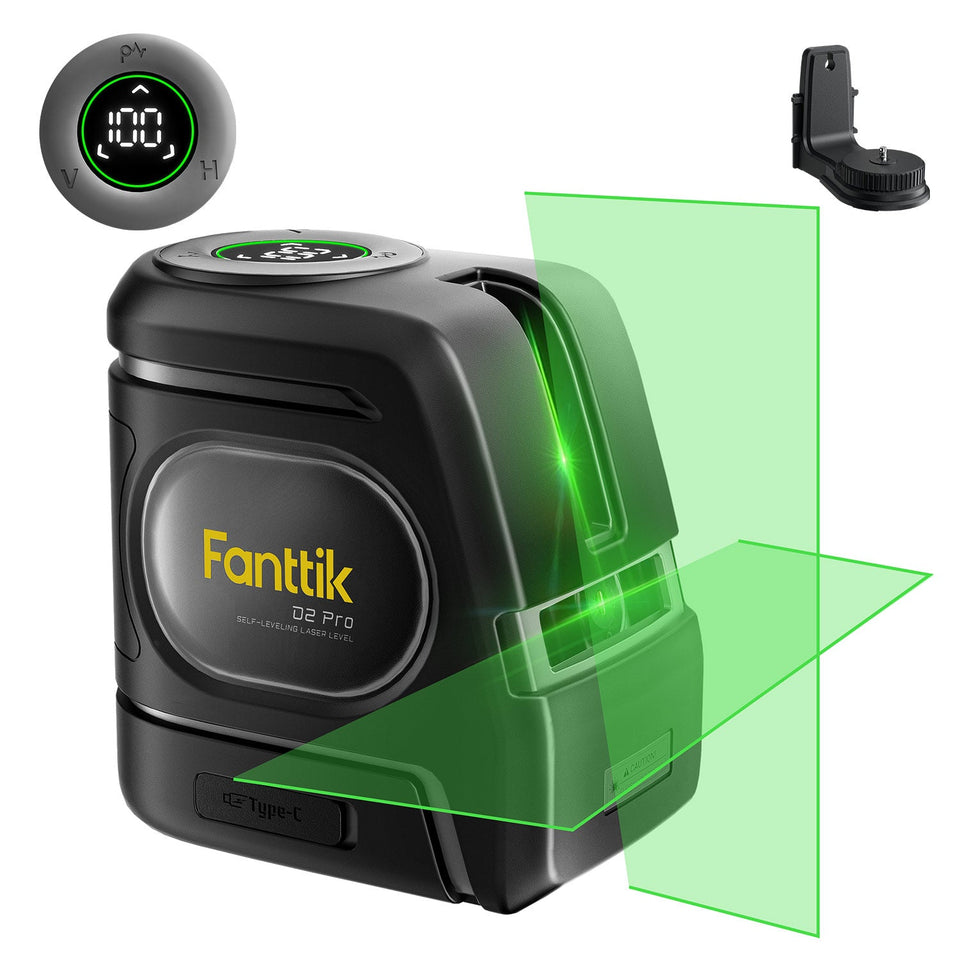
- D2 PRO — project the horizontal line, the vertical line, or both as a cross. Running a single line extends battery life (up to 14 hours on one laser versus 7 hours on two).
- D16 APEX — cycle through its line combinations up to the full 16 lines across four 360° planes. The 360° horizontal plane is ideal for marking a continuous level line around a whole room; the 360° vertical planes help with layout, framing, and plumb references.
Project only the lines you actually need. Fewer active lines means a brighter beam where you are working and longer runtime.
Step 4: Manual / Tilt Mode for Angled Lines
Self-leveling is perfect for level and plumb work, but stairs, ramps, and pitched layouts need an intentional angle. Both models include a manual mode that locks the pendulum so you can tilt the head and hold a sloped line.
Switch to manual mode, position the unit at the angle you need, and the line stays fixed at that tilt instead of self-correcting. Remember to switch back to self-leveling mode for normal level/plumb tasks — a locked pendulum will not warn you when the unit is off-level.
Step 5: Outdoor Pulse Mode
Bright sunlight washes out any laser line. For outdoor or long-range work, press the pulse mode button to make the beam detectable by a laser receiver (detector). With a receiver, the working range extends up to 200 ft. The line may look dimmer to your eye in pulse mode — that is expected; the receiver, not your eye, is doing the detecting at distance.
Step 6: Mount It
Both levels use a standard 1/4"-20 thread, so they fit common camera tripods and laser-level mounts. The D2 PRO ships with a mounting bracket. For ceiling, tile, or photo-hanging work, mounting the unit beats holding it — your hands stay free and the line never drifts.
Charging and Storage
Recharge over USB-C when the LED display shows a low battery. The D2 PRO carries a 2600 mAh battery; the D16 APEX carries a larger 5200 mAh pack for longer sessions. When you finish, store the unit in its case. The D2 PRO's IP54 rating handles jobsite dust and splashes, and the D16 APEX's TPR housing survives a 1 m drop — but neither is waterproof, so keep them dry in storage.
Frequently Asked Questions
Q: Why are the laser lines blinking and not settling?
A: Blinking usually means the unit is tilted beyond its self-leveling range. Set it on a flatter surface or adjust your tripod until the lines stop blinking and hold steady. If it sits level and still blinks, see the self-leveling troubleshooting guide below.
Q: How do I project a sloped line for a staircase?
A: Switch to manual (tilt) mode. That locks the pendulum so you can angle the head and hold a fixed sloped line instead of having it self-correct to level.
Q: The line looks faint outdoors. Is the laser weak?
A: No. Sunlight overpowers any laser line outdoors. Turn on pulse mode and use a laser receiver to detect the beam — with a receiver the range reaches up to 200 ft.
Q: Can I run just one line to save battery?
A: Yes. On the D2 PRO, a single laser runs up to 14 hours versus 7 hours with two lasers. On the D16 APEX, projecting fewer lines also extends runtime. Use only the lines you need.
Q: What tripod fits these levels?
A: Both use a standard 1/4"-20 thread, so most camera tripods and laser-level mounts fit directly.
Q: How do I charge it?
A: Charge over USB-C. The LED display shows the battery level so you can confirm when it is full.
Related Support
- Fanttik Laser Level Manual — full setup, controls, and where to find the manual for the D2 PRO and D16 APEX
- Laser Level Self-Leveling Not Working — fixes for blinking beams and lines that won't settle
- Fanttik D2 PRO product page
- Fanttik D16 APEX product page
- Fanttik Support Center
Continue reading
 Fanttik X9 Pro Manual & Quick-Start Guide
Download the Fanttik X9 Pro manual PDF and learn quick-start setup: charging, target pressure with auto-stop, the 4...
Fanttik X9 Pro Manual & Quick-Start Guide
Download the Fanttik X9 Pro manual PDF and learn quick-start setup: charging, target pressure with auto-stop, the 4...
 Fanttik Laser Level Self-Leveling Not Working: Pendulum & Tilt Fix
Fanttik D2 PRO or D16 APEX won't self-level? Fix the locked pendulum, out-of-range tilt warning, and calibration drift...
Fanttik Laser Level Self-Leveling Not Working: Pendulum & Tilt Fix
Fanttik D2 PRO or D16 APEX won't self-level? Fix the locked pendulum, out-of-range tilt warning, and calibration drift...

Leave a comment
This site is protected by hCaptcha and the hCaptcha Privacy Policy and Terms of Service apply.